Table of Contents
Solar plants do not stop working every time a cloud passes over them. However, their power output can change within seconds as the amount of sunlight reaching the solar modules changes.
For engineers, technicians and solar O&M teams, understanding what happens to a solar plant when clouds pass over is important because short-term changes in irradiance can be seen directly in the plant’s electrical data.
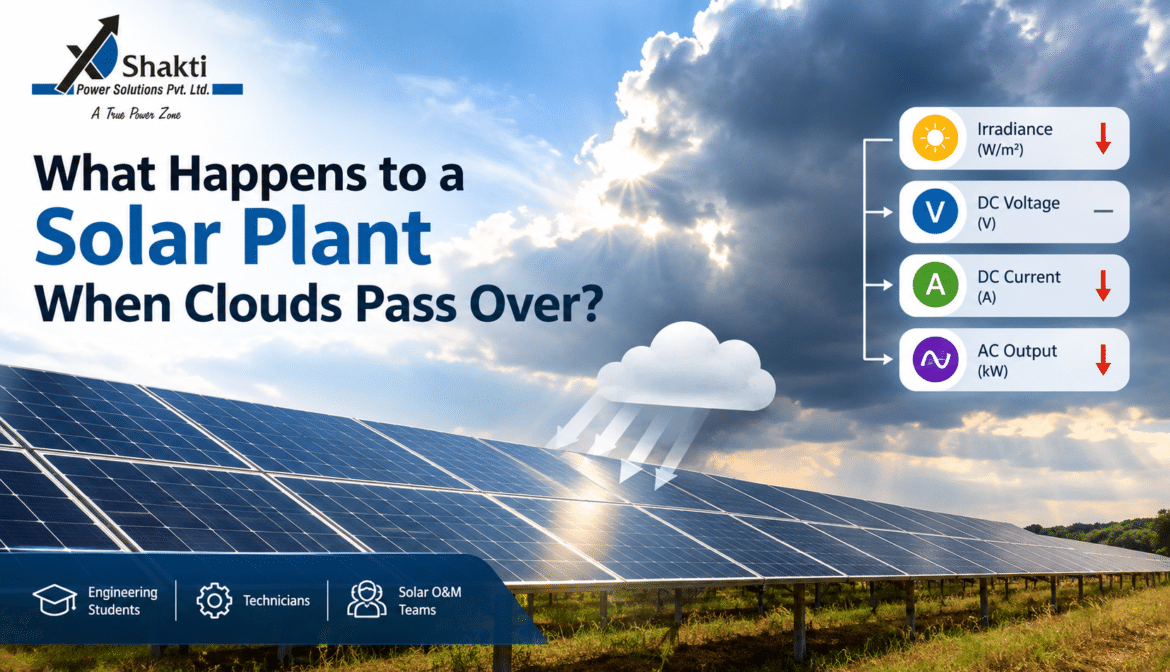
When a cloud moves across a solar array, irradiance decreases. This affects the current produced by the PV modules, changes the DC power available to the inverter and can eventually cause a fluctuation in AC output.
But how much does the output actually change?
The answer depends on the cloud cover, irradiance level, plant configuration, module temperature, shading, inverter behaviour and the speed at which the cloud moves across the site.
Let’s look at what happens step by step.
What Happens to a Solar Plant When Clouds Pass Over?
The simplest way to understand it is:
Cloud movement → Change in irradiance → Change in PV current → Change in DC power → Change in inverter AC output
Solar panels use sunlight to generate electricity. The amount of solar radiation reaching the module surface is commonly described as irradiance, measured in watts per square metre (W/m²).
When a cloud blocks part of the sunlight, irradiance reaching the modules decreases. Since PV current is strongly influenced by the available irradiance, the current generally falls as well.The U.S. Department of Energy explains the difference between direct and diffuse solar radiation and how atmospheric conditions such as clouds affect the solar resource
As a result, the DC power available from the array decreases.
The inverter then converts the available DC electricity into AC electricity, so the reduction can also appear as a temporary drop in AC power at the plant level.
Once the cloud moves away and irradiance increases again, the electrical output can recover.
This can happen surprisingly quickly.
How Does Cloud Cover Affect Solar Irradiance?
Irradiance is one of the most important parameters to monitor when studying solar plant performance.
Under relatively clear conditions, a PV array receives a higher amount of solar irradiance. When clouds pass over the array, some of the incoming solar radiation is scattered, reflected or absorbed before reaching the modules.
This means the irradiance measured at the plant can change rapidly.
For example, imagine a plant operating under relatively stable sunlight. If a dense cloud moves over the array, the irradiance sensor may show a sudden decline.
At almost the same time, the plant’s DC current and power may begin to decrease.
When the cloud moves away, irradiance rises again and the plant output can recover.
However, the relationship is not always perfectly smooth.
Clouds Can Also Cause Short-Term Irradiance Spikes
An interesting phenomenon can occur around broken or moving clouds.
Sunlight can sometimes be reflected or scattered by the edges of clouds, temporarily increasing the irradiance reaching a PV array.
This means a plant can occasionally experience a short irradiance spike rather than only a reduction.
For O&M teams, these short-term variations are useful because they show why a solar plant should be evaluated using actual operating data instead of assuming that every cloudy period produces the same response.
What Happens to DC Voltage When Clouds Pass Over?
A common question during solar plant monitoring is whether cloud cover causes the DC voltage to fall in the same way as current.
The answer is: not necessarily to the same extent.
In a PV system, voltage and current respond differently to changes in irradiance.
When irradiance decreases, the PV current generally changes more noticeably, while the operating voltage may remain comparatively stable over a certain range.
The exact behaviour depends on factors such as:
- Module characteristics
- String configuration
- Number of modules connected in series
- Module temperature
- Inverter MPPT operation
- Irradiance level
- Shading conditions
The inverter continuously searches for the maximum power point (MPP) of the PV array.
Therefore, when a cloud passes over the array, the inverter may adjust the operating point to extract the available power from the changing sunlight conditions.
This is one reason why looking at voltage alone is not enough to understand the impact of clouds.
What Happens to DC Current?
DC current usually shows a clearer response to changing irradiance.
In simple terms:
Higher irradiance → Higher PV current
Lower irradiance → Lower PV current
So when a cloud passes over the array, the DC current can decrease.
If the cloud is moving quickly, the current can change quickly as well.
For a large solar plant, the effect can vary across different sections of the array. One part of the plant may be covered by the cloud while another part is still receiving stronger sunlight.
This can create differences between string currents, combiner boxes, MPPT inputs or inverter channels.
That is why string-level and inverter-level monitoring can be valuable during O&M activities.
How Does Cloud Cover Affect AC Power Output?
The final effect most plant operators notice is a change in AC output power.
The basic relationship is:
DC Power ≈ DC Voltage × DC Current
As irradiance decreases, DC current generally decreases. Therefore, the DC power available to the inverter also decreases.
The inverter then supplies less AC power to the electrical system.
For example, a plant producing high power under strong sunlight may show a noticeable reduction when a dense cloud covers the array.
When the cloud moves away, the AC output can rise again.
The response may look like a series of rises and falls on a plant monitoring graph, especially on partly cloudy days.
This is not automatically a sign of a fault.
The important question is whether the electrical behaviour matches the weather and irradiance conditions at that time.
Does the Solar Plant Stop Generating During a Cloudy Period?
No.
Solar panels can continue generating electricity under cloudy conditions because they can use both direct and diffuse solar radiation.
However, the amount of electricity generated can be lower than under strong, clear-sky conditions.
The reduction depends on the density and type of cloud cover.
A thin cloud layer may have a relatively small impact, while dense clouds can cause a much larger reduction in irradiance and power output.
This is why simply categorising a day as “cloudy” is not enough for performance analysis.
Actual irradiance measurements provide much more useful information.
If you want to understand this in more detail, see our related article:
[ Solar Panels on Cloudy Days: Do They Really Work?]
A Practical Experiment: Monitor What Happens When a Cloud Passes
One of the easiest ways for engineering students, technicians and O&M professionals to understand cloud-related power fluctuations is to compare plant data with weather conditions.
You don’t need an extremely complicated experiment.
A basic monitoring exercise can provide useful information.
Step 1: Select a Time Period
Choose a period during which clouds are moving across the solar plant.
A partly cloudy day is particularly useful because the irradiance may change several times during the observation period.
Record the time at regular intervals, or use the plant’s monitoring system if it automatically stores data.
Step 2: Record Irradiance
Record the solar irradiance in W/m².
An irradiance sensor or pyranometer can be used for this measurement.
The important point is to record the irradiance at the same time as the electrical parameters.
Step 3: Record DC Voltage and Current
Depending on the monitoring system available, record:
- DC voltage
- DC current
- DC power
For a larger plant, measurements can be taken at inverter or MPPT level.
If string-level monitoring is available, differences between strings can also be studied.
Step 4: Record AC Output
Record the inverter or plant’s AC output power.
This allows you to compare the change in solar resource with the actual electrical output delivered by the inverter.
Step 5: Record Temperature
Module and ambient temperature can affect PV performance.
Therefore, temperature should also be included in the observation.
Module temperature is particularly useful because PV module voltage generally changes with temperature.
Step 6: Record Weather Conditions
Don’t just write “cloudy.”
Try to describe the actual condition:
- Clear sky
- Thin clouds
- Dense clouds
- Moving clouds
- Partial cloud cover
- Rain
- Cloud-free period
This makes the final comparison much more useful.
Example Solar Plant Monitoring Table
A simple observation table could look like this:
| Time | Irradiance (W/m²) | DC Voltage (V) | DC Current (A) | AC Output (kW) | Temperature (°C) | Weather |
|---|---|---|---|---|---|---|
| 11:00 | 850 | 720 | 410 | 285 | 34 | Mostly clear |
| 11:05 | 690 | 715 | 335 | 235 | 34 | Cloud approaching |
| 11:10 | 430 | 708 | 210 | 145 | 33 | Dense cloud |
| 11:15 | 610 | 714 | 300 | 205 | 33 | Cloud moving away |
| 11:20 | 820 | 720 | 395 | 275 | 34 | Mostly clear |
Note: These figures are illustrative only. Actual values will vary depending on the plant, module configuration, inverter capacity, weather and operating conditions.
The important thing is not the exact numbers.
The purpose is to observe the relationship between irradiance and electrical output.
What Should You Look for in the Data?
Once the observations are collected, compare the parameters side by side.
1. Irradiance vs DC Current
Look for whether a reduction in irradiance is accompanied by a reduction in DC current.
This is generally one of the clearest relationships you will see.
2. Irradiance vs AC Output
Compare the irradiance graph with the AC power graph.
If both curves rise and fall together as clouds move over the plant, the weather condition may explain the power fluctuation.
3. DC Voltage Behaviour
Check whether voltage remains relatively stable or changes significantly during the cloud event.
Unexpected voltage behaviour may require additional investigation.
4. Different Inverters or Sections
If monitoring data is available for multiple inverters, compare them.
If the entire plant experiences a similar drop at the same time, changing irradiance is a possible explanation.
If only one inverter or section behaves differently, further investigation may be necessary.
5. Temperature
Compare temperature with voltage and output.
Temperature can influence PV module voltage, so it is useful to consider it when analysing plant performance rather than looking only at irradiance.
When Is a Cloud-Related Power Drop Normal?
A temporary reduction in power is generally expected when a cloud significantly reduces the irradiance reaching the PV array.
The key is to look at the complete picture.
For example:
Cloud passes → irradiance falls → DC current falls → DC power falls → AC output falls → cloud moves away → irradiance rises → output recovers
This pattern can be a normal response to changing weather.
However, if the plant continues to show unusually low output after irradiance has recovered, the situation deserves closer investigation.
Possible areas to check include:
- Module soiling
- Partial shading
- String faults
- Inverter alarms
- DC connection problems
- MPPT issues
- Communication problems
- Sensor errors
This is where plant monitoring becomes especially useful for O&M teams.
Why Weather Data Should Be Compared With Plant Data
Looking at a power graph without looking at weather conditions can sometimes lead to the wrong conclusion.
Suppose AC output suddenly falls by 30%.
Without additional information, this could appear to be an equipment problem.
But if the irradiance sensor shows that irradiance also dropped sharply at exactly the same time because of dense cloud cover, the explanation may simply be changing weather conditions.
On the other hand, if irradiance remains stable while one inverter’s output suddenly drops, the situation deserves further investigation.
This simple comparison can help O&M teams separate weather-related fluctuations from potential equipment-related issues.
Solar energy production can vary with clouds, dust, haze and other environmental conditions, which is why weather data should be considered when analysing plant performance.
How Solar O&M Teams Can Use This Information
Cloud-related fluctuations are not only useful for students studying photovoltaic systems.Monitoring generation data is also useful when evaluating the overall energy performance of an industrial facility. For a broader approach to energy monitoring, see our energy audit checklist for Indian industries.
They are also important during day-to-day plant operation and maintenance.
O&M teams can use irradiance and power data to:
- Identify normal weather-related fluctuations
- Investigate unexpected generation losses
- Compare inverter performance
- Detect unusual string behaviour
- Validate sensor readings
- Understand plant performance under different weather conditions
- Improve performance analysis and reporting
The more consistently the data is recorded, the easier it becomes to identify patterns.
Final Takeaway
So, what happens to a solar plant when clouds pass over?
The main change begins with irradiance.
When clouds reduce the sunlight reaching the PV modules, DC current generally decreases. The DC power available to the inverter falls, and AC output can decrease as a result. When the cloud moves away and irradiance increases, the plant’s output can recover.
But the most useful lesson is not simply that “clouds reduce solar generation.”
For engineers and O&M teams, the real value comes from comparing irradiance, DC voltage, DC current, AC output, temperature and weather conditions together.
The next time you see a sudden change in solar generation, don’t look at the power graph alone.
Check what the sky—and the irradiance sensor—were doing at the same time.
Start Monitoring Your Plant Data
If you work with a solar plant, try recording irradiance, voltage, current, AC output, temperature and weather conditions during a partly cloudy day.
Compare the readings before, during and after a cloud passes over the array.
These simple observations can help you understand how your plant responds to changing weather and can also make it easier to identify unusual behaviour that deserves further O&M investigation.
For professional solar performance analysis and energy-related support, SPSPL can help you understand plant performance using real operating conditions and data.
Frequently Asked Questions
Does a solar plant stop generating when clouds pass over?
No. Solar panels can continue generating electricity under cloudy conditions because they can receive diffuse solar radiation. However, power output may decrease when irradiance falls.
What happens to solar panel current when clouds pass?
PV current generally decreases when irradiance decreases. The size of the change depends on the intensity and distribution of the cloud cover and the operating conditions of the solar array.
Does solar panel voltage drop when clouds pass?
Voltage can change, but it generally does not respond to irradiance changes in exactly the same way as current. PV voltage is also affected by factors such as module temperature and inverter MPPT operation.
Why does AC output fluctuate on a cloudy day?
Moving clouds cause changes in irradiance. These changes affect the DC power generated by the PV array, which can result in corresponding fluctuations in inverter AC output.
How can I monitor the effect of clouds on a solar plant?
Record irradiance, DC voltage, DC current, AC output, temperature and weather conditions at the same time. Comparing these parameters helps identify the relationship between weather and plant performance.